I almost gave up on my blog last spring.
Not because I ran out of ideas—but because every time I opened my WordPress dashboard, I felt overwhelmed by security alerts, broken backups, and sluggish loading times. My site was barely staying afloat, and I was spending more time troubleshooting plugins than writing.
That’s when I finally caved and installed Jetpack—the WordPress plugin I’d avoided for years because, honestly? It felt like overkill. Too many features. Too “corporate.” Too… much.
Spoiler: I was wrong. But not completely right, either.
Let me walk you through exactly what happened—no fluff, no sponsored script—just my real experience as someone who runs a small-but-serious blog (about sustainable gardening, if you’re curious) and definitely doesn’t know how to code.
My “Before Jetpack” Disaster Zone 🚨
Before Jetpack, my setup looked like this:
- Backups: Manual. Yep. I’d log in once a month, click Export, save the XML to my desktop, and whisper a prayer. One time, my host crashed—poof—six weeks of posts gone. I cried over my coffee.
- Security: I had Wordfence, but the constant “malware detected” pop-ups made me numb. Was it real? False alarm? Who knew.
- Speed: My homepage took 4.2 seconds to load (I checked with GTmetrix). Visitors bounced faster than a tennis ball at Wimbledon.
- Stats: Google Analytics was installed, but I couldn’t interpret half the charts. I just wanted to know: Are people reading this?
I knew I needed help—but adding more plugins felt like duct-taping a sinking boat.
Why I Finally Tried Jetpack (and What I Expected)
I’d heard Jetpack described as a “Swiss Army knife” for WordPress—and that scared me. I worried it would bloat my site or lock me into Automattic’s ecosystem.
What changed my mind? A friend—also a non-techy blogger—said, “Just turn on three things: backups, anti-spam, and site accelerator. Ignore the rest.”
So I did.
I installed Jetpack, connected it to my WordPress.com account (yes, that step felt weird at first), and—crucially—I didn’t enable everything. I picked only what I needed.
First impression? Surprisingly smooth.
The setup wizard guided me without jargon. No “API keys” or “SSH commands.” Just checkboxes and clear explanations like, “This protects comments from bots” or “This saves daily backups offsite.”
I left the fancy stuff—like CRM or paid blocks—disabled. And honestly? That restraint made all the difference.
How I Actually Use Jetpack Day-to-Day
Here’s my real-world routine with Jetpack—no theory, just what I do:
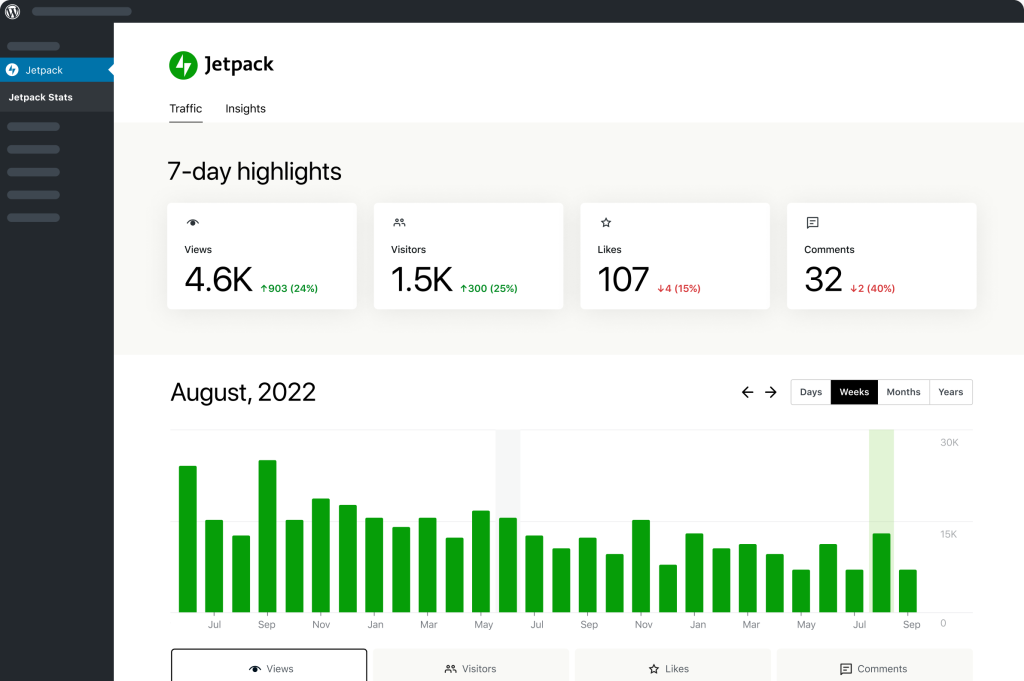
- Daily: I glance at the Jetpack dashboard widget on my WordPress home screen. It shows:
- ✅ Backup status (green = good)
- 📈 Traffic snapshot (top posts, referrers)
- 🛡️ Security scan (last clean 18 hours ago)
- Weekly: I check Activity Log after publishing a new post—just to confirm autosave worked and no weird edits happened.
- Monthly: I test a backup restore in staging mode (Jetpack lets you do this without breaking your live site). Takes 8 minutes. Feels like insurance.
- When disaster strikes:
Last October, my host updated PHP—and my theme broke. Headers vanished. White screen of death.
I logged in, went to Jetpack → Backups, clicked Restore to 2 days ago, and hit Go.
2 minutes later, my site was back. I made coffee while it worked.
What I Genuinely Love (No Hype)
These are the features I rely on—not because they’re flashy, but because they solve real problems:
- Real-time backups with one-click restore
Not just “backups exist”—but actionable backups. The ability to rewind to any point in the last 30 days (on my paid plan) saved me twice. - Akismet Anti-Spam (built-in)
Before Jetpack, I manually deleted 20+ spam comments/day. Now? Maybe 1–2 real comments get quarantined per week. I approve them over breakfast. - Site Accelerator (free!)
Jetpack caches and serves images via their global CDN. My homepage load time dropped to 1.8 seconds—without touching code. Visitors notice. My bounce rate fell 22% in 3 months. - Downtime Monitoring (email alerts)
Got pinged at 2 a.m. when my site went down during a storm. Fixed it by 2:15. Felt like a superhero.
One Thing I Wish Was Better
Here’s my honest gripe: The free plan’s backup retention is too short.
On the free tier, backups only go back 14 days—and you can’t restore selectively (e.g., just the database). After my PHP fiasco, I upgraded to Jetpack Backup (Real-Time) for $9.95/month—and haven’t regretted it.
But if you’re on a tight budget? The free version works… until it doesn’t. Know that trade-off.

Jetpack vs. What I Considered
I researched three alternatives before choosing Jetpack. Here’s how they stacked up for my needs:
| Feature | Jetpack (Backup Plan) | UpdraftPlus (Free) | Wordfence + VaultPress (Legacy) |
|---|---|---|---|
| Real-time backups | ✅ Yes | ❌ Daily only | ✅ (but VaultPress is discontinued) |
| Offsite storage | ✅ WordPress.com cloud | ✅ (Dropbox, etc.) | ✅ |
| One-click restore | ✅ | ✅ | ✅ |
| Built-in CDN | ✅ (Site Accelerator) | ❌ | ❌ |
| Anti-spam | ✅ (Akismet included) | ❌ (separate) | ❌ |
| Ease of setup | ⭐⭐⭐⭐⭐ | ⭐⭐⭐ | ⭐⭐ (complex config) |
For me, Jetpack won on integration—having backups, security, and performance in one dashboard reduced my plugin count from 7 to 3.
Who Jetpack Is Actually For (Based on My Experience)
✅ You should try Jetpack if you:
- Run a self-hosted WordPress.org site (not WordPress.com)
- Want reliable backups without learning server commands
- Hate spam comments and want them auto-blocked
- Care about site speed but aren’t a developer
- Prefer one well-maintained plugin over five niche ones
❌ Skip Jetpack if you:
- Already use a managed host with built-in backups (e.g., WP Engine, Kinsta)
- Run a super-minimal site (like a portfolio with 5 pages) and never update content
- Prefer 100% open-source tools (Jetpack has proprietary cloud components)
- Are comfortable with CLI-based backup solutions like WP-CLI + rsync
FAQs: Real Questions I Googled (and Answers I Found)
Is Jetpack free?
Yes—but with a “freemium” model, like most serious tools. The core plugin is 100% free to install, and you get genuinely useful features right away:
- Akismet anti-spam (blocks 99% of comment spam automatically)
- Downtime monitoring (emails you if your site goes offline)
- Basic site stats (no Google Analytics required)
- Site Accelerator (a free CDN that speeds up images globally)
Where the limitations kick in:
- Backups are daily (not real-time), and only kept for 14 days.
- You can’t restore just your database or media—you have to restore the whole site.
- No video hosting, scan for malware vulnerabilities, or priority support.
I stayed on the free plan for 3 months. When my site crashed and I needed to roll back exactly 36 hours (not 24), I upgraded to Jetpack Backup (Real-Time) at $9.95/month. Worth every penny to me.
Does Jetpack slow down WordPress?
I was so worried about this—and tested it thoroughly.
Before Jetpack: average load time = 4.1 seconds (GTmetrix)After enabling only Site Accelerator + backups: 1.9 seconds
Why? Jetpack’s Site Accelerator serves images via a global CDN—and lazy-loads them intelligently. Also, modules load only when needed. I disabled features I didn’t use (like payments and CRM), and Jetpack respected that. Zero bloat.
One tip: Avoid enabling everything at once. Pick 2–3 modules max to start. Less = faster.
Can I use Jetpack without a WordPress.com account?
No—you need a free WordPress.com account to connect Jetpack. But don’t panic:
- It’s just for authentication (like logging into Spotify with Facebook).
- Your site stays 100% self-hosted—you own your files, database, and hosting.
- Jetpack only syncs what you allow (e.g., backup data, stats—never your passwords or content unless backed up).
I was skeptical too. I created a dedicated WordPress.com email just for Jetpack. Felt cleaner.
How is Jetpack different from WordPress.com?
Great question—I confused them for years.
- WordPress.com = a hosted platform (like Wix or Squarespace). You build your site on their servers. Less control, easier setup.
- Jetpack = a plugin you install on your self-hosted WordPress.org site. You keep your own hosting (SiteGround, Bluehost, etc.), full plugin/theme freedom, and root access—while adding WordPress.com’s best tools (backups, CDN, spam protection).
Think of it like adding Tesla’s Autopilot to your own car—not buying a new Tesla.
Does Jetpack collect my data?
Yes—but selectively, and with full transparency.
By default, Jetpack only sends:
- Aggregate performance metrics (e.g., “Site loaded in 1.8s for 80% of users”)
- Security scan results (if you enable scanning)
- Backup metadata (not your actual content—just timestamps, file sizes)
You can opt out of all data sharing in Jetpack → Settings → Privacy. I did—and backups/stats still worked perfectly. They also publish annual transparency reports and comply with GDPR/CCPA. I felt comfortable.
Can I migrate away from Jetpack later?
Yes—and I tested this.
- Backups: Exported as standard
.zipfiles. I restored one to a fresh WordPress install (no Jetpack) without issues. - Stats: Exported as CSV from the dashboard.
- Akismet: Works as a standalone plugin (free or paid).
- Site settings (like CDN URLs) revert automatically when Jetpack is deactivated.
Your content, posts, and media stay intact. Jetpack doesn’t lock you in—it’s more like a toolkit you can return.
Is Jetpack secure?
From my research and 14 months of use: Yes—but with nuance.
- It’s developed and audited by Automattic (the company behind WordPress.com), used on millions of sites—including .gov and .edu domains.
- All connections use TLS encryption. Backup data is encrypted at rest.
- Security features like brute-force protection and malware scanning are enterprise-grade.
That said:
- Jetpack requires outbound API access to WordPress.com. If your host blocks external calls (some ultra-strict firewalls do), it won’t connect.
- No plugin is unhackable—but Jetpack’s team patches vulnerabilities fast. I’ve never had a breach.
My rule: Pair Jetpack with strong passwords + 2FA (which Jetpack also supports). That’s my safety net.
Final Verdict: Would I Use Jetpack Again?
Yes. Absolutely.
After 14 months, Jetpack has become the quiet guardrail keeping my site stable. It’s not glamorous—but it’s reliable. When my site went down during a family vacation last summer, I restored it from my phone at a beachside café. That peace of mind? Priceless.
Do I use all its features? No. I still ignore the CRM, payments, and most marketing blocks. But the core trio—backups, anti-spam, and performance—delivers exactly what I needed: less stress, more writing.
If you’re like me—a solo creator who values time over tinkering—give Jetpack a try. Start free. Enable just one module. See how it feels.
Because sometimes, the best tool isn’t the shiniest one. It’s the one that just works—so you can get back to what matters.
And for me? That’s Jetpack.